From project documents to a completed commissioning record.
One platform covers the full commissioning lifecycle — plan authoring, field execution, and issues tracking — accelerated at every step by an AI agent designed around real commissioning workflows and deliverables.
Five steps from documents to a closed-out project.
Bring in your documents
Contract documents, submittals, RFIs, addenda, controls schematics, and O&M manuals — the same records your team already has.
The agent drafts your plan
A commissioning plan, prefunctional checklists, and functional test procedures are generated for the specific equipment on the project.
You review and approve
You review every draft and edit it as needed, right in the chat interface, before it becomes a project deliverable. Nothing goes out until you approve it.
The field completes forms
Technicians, subcontractors, and owner reps open forms from a secure link — any browser, any device, nothing to install.
Issues log itself
Flagged items, failed tests, and deficiencies are compiled automatically into one live, categorized issues log.
Pillar 1: project-specific deliverables, drafted from the technical record. Pillar 2: a live, evidence-linked issues record.
On most projects, the issues log is the most painful document to keep current. Deficiencies live scattered across field checklist comments, punchlists, submittal review notes, TAB reports, and email threads. Cx AIgent continuously reads all of it — checklist flags, failed tests, photo annotations, punchlist entries, and review comments — and compiles a single, cross-referenced log in real time, cutting down manual data entry and the risk of a deficiency getting lost in someone's notebook. Your team still reviews, assigns, and closes every item.
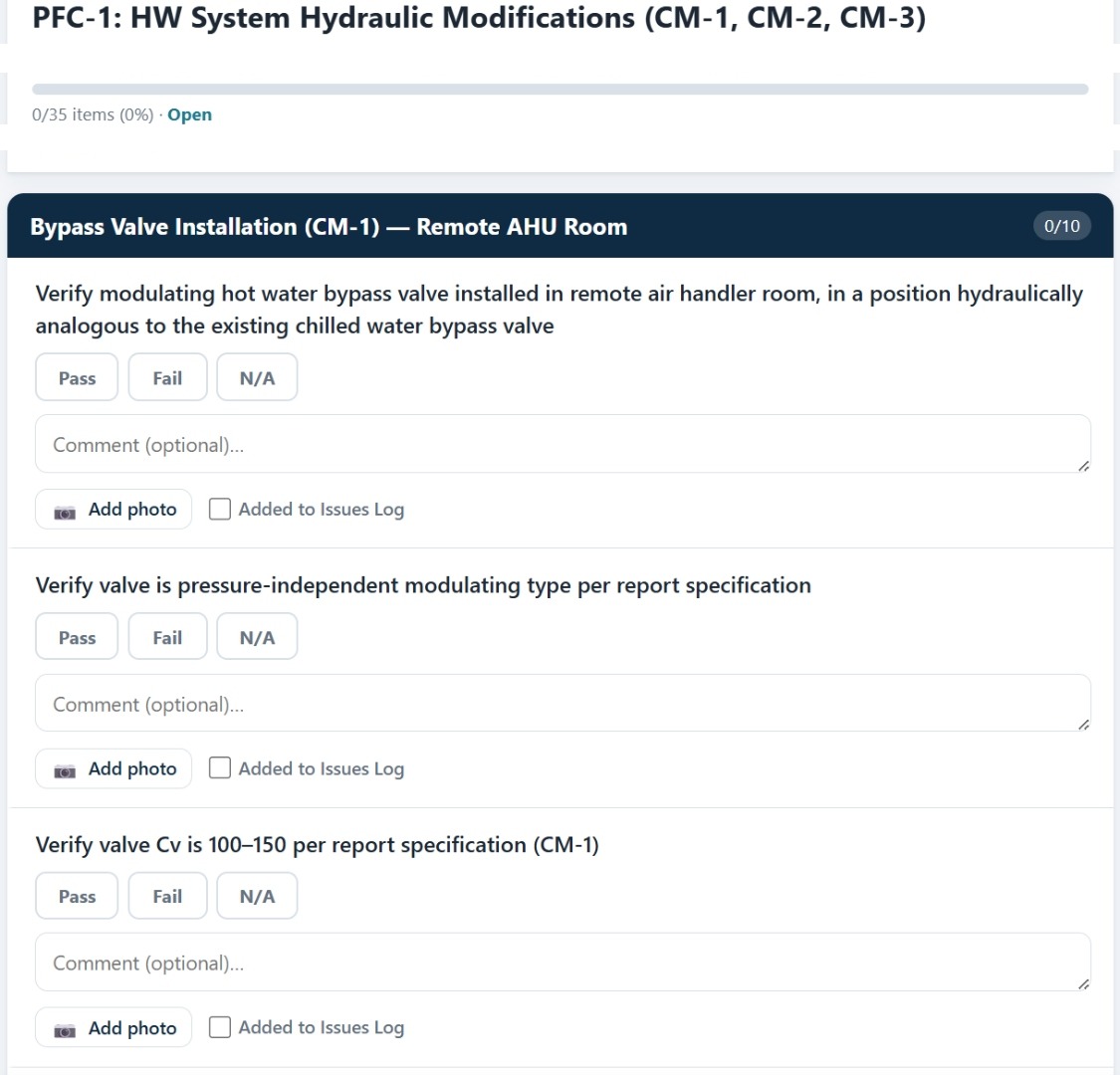
What your crew actually sees on-site.
Every prefunctional and functional checklist opens as a scoped, mobile-friendly form — Pass / Fail / N/A per item, an optional comment, a photo, and a one-tap flag straight to the issues log. No separate app, no login screen, just the link.
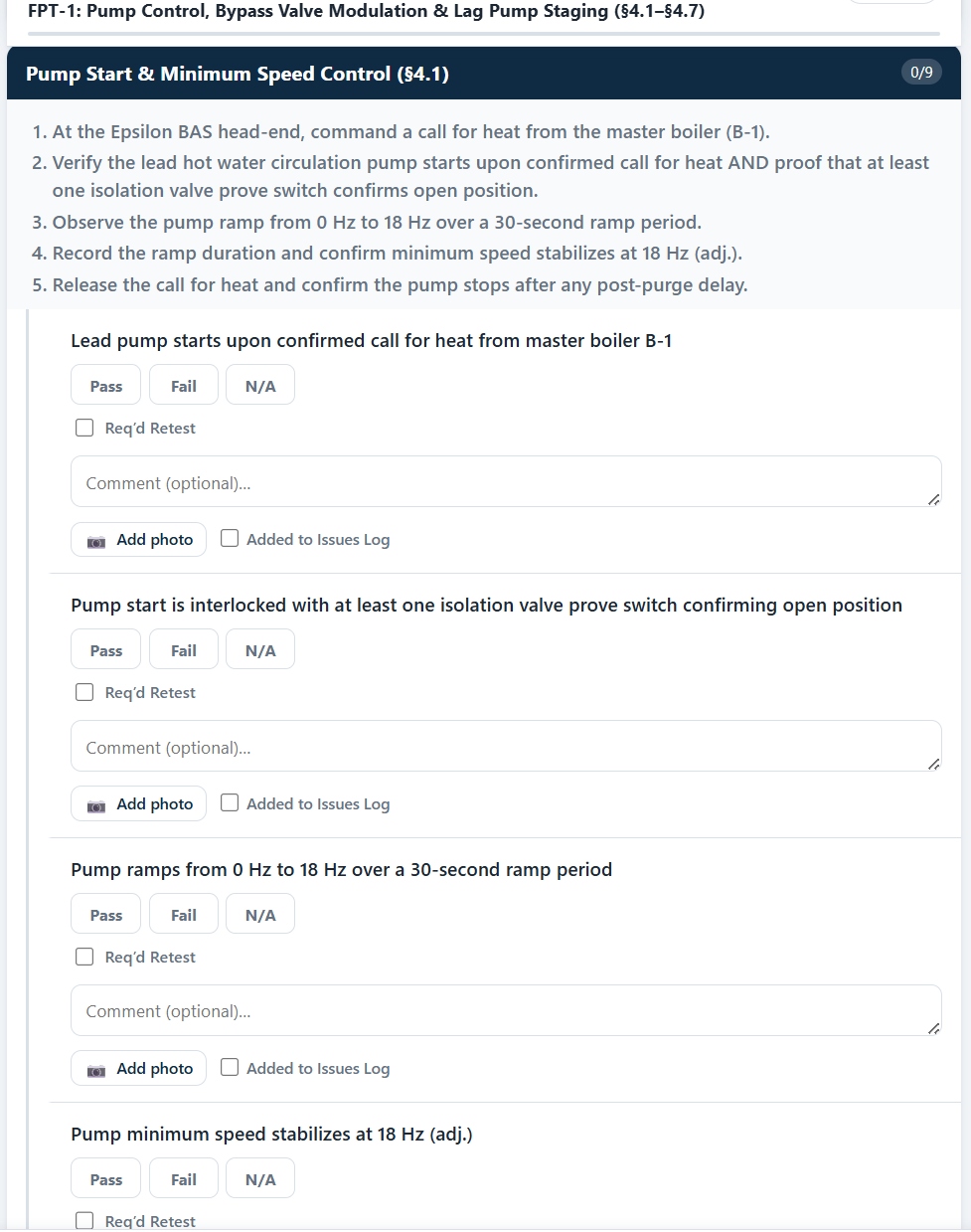
Test steps that read like a real FPT, because they are one.
Functional performance tests are broken into numbered procedural steps tied directly to a controls sequence paragraph — here, hot water pump start and minimum-speed control under sequence §4.1 — with a Pass / Fail / N/A and a required-retest flag on every checkpoint.
Every participant is free. Only the project has a fee.
Traditional platforms charge by seat — so the more subcontractors and owner reps you bring onto a project, the more it costs. Cx AIgent's link-based access means the commissioning provider pays a single project fee, and every subcontractor, inspector, and owner representative accesses their forms at no additional cost, with full audit logging on every view.
Built to work alongside Procore.
Most general contractors and commissioning teams already manage submittals, RFIs, and project documentation in Procore. Cx AIgent is designed to extend that existing record rather than duplicate it. Direct Procore integration is an active part of our roadmap — pulling project documentation in, and pushing commissioning deliverables and issues back out — so your team never has to re-enter the same data twice.
Good to know.
Does this replace me as the commissioning provider?
No. Cx AIgent assembles, tracks, and formats commissioning documentation — it never issues a deliverable on its own. You review every draft and make edits directly through the chat interface before anything becomes a project record. That review step is intentional and non-negotiable.
What documents does it need to get started?
Whatever your project already has: contract documents, specifications, approved submittals, RFIs, addenda, controls schematics and sequences of operation, and O&M manuals. The more complete the document set, the more specific the generated plan and checklists.
Do subcontractors and owner reps need an account?
No. Field forms and the issues log open from a signed, scoped, expiring link — no app, no account, no download. Every link is single-use or time-limited and fully audit-logged, so access stays controlled without adding friction.
What if my project doesn't use Procore?
Cx AIgent works as a standalone platform today — Procore integration is a roadmap item, not a requirement. You can upload project documents directly regardless of what construction management platform your team uses.
Bring us your next project's documents.
We'll show you what a tailored Cx plan and checklist set looks like for your own equipment — not a demo project.
Request early access